Venue Operations Software

Venue operations software

Built for the Saturday your best person called in sick.

At a glance: VenueChief is venue operations software that runs the whole day on one system: bookings, check-in, the floor, food and drink, extra time and the end-of-day close. Guests do more of the routine steps on their own phones and at the kiosk, so the staff you have can look after the people in front of them.
A day, start to finish

A Saturday in six moments.

Here is one busy day, moment by moment, and what VenueChief does at each one. Every card links down to the article with the detail.

1 · Arrive

The paperwork is done before they park.

Guests book online and sign the waiver on their own phone, and each person in a group can get their own link. Book Now can ask each driver’s date of birth, so every driver gets a profile, signs online and receives their own results.

How online waivers work →

2 · Check in

One row per person, at the desk or the kiosk.

The desk sees one row per guest, with the waiver, guardian and date of birth inside it, and check-in matches guests to the customers you already have. The kiosk asks for everything a guest still needs, such as a waiver, the safety video or a guardian’s signature, before it takes payment.

How check-in works →

3 · Play

Start sessions from one board.

The Operations board shows every booking with a Ready count and a Start button, and a session does not start while a waiver or safety step is missing. Bookings can also start a game, open a program or switch the lights at the moments you choose (early access: we set it up with you).

See the Operations board ↓

4 · Eat

The pizza arrives when the race ends.

Party packages can include "1 drink and 1 snack per guest", and timed party food goes to the kitchen just before the session ends. The register handles combos, split checks and kitchen stations, and table ordering by QR code is there when you turn it on. Party food and table ordering are part of the Food and Beverage pack.

How food and drink works →

5 · Add time

Extra time without fetching the card again.

When you turn it on, the card hold covers the booking plus an allowance, so extra time is charged from the hold (Stripe or Square). Guests can accept an offer by replying YES to a text, and anything left goes on a "Collect on the way out" list for the desk.

How guests book and pay →

6 · Close

Close the day on one screen.

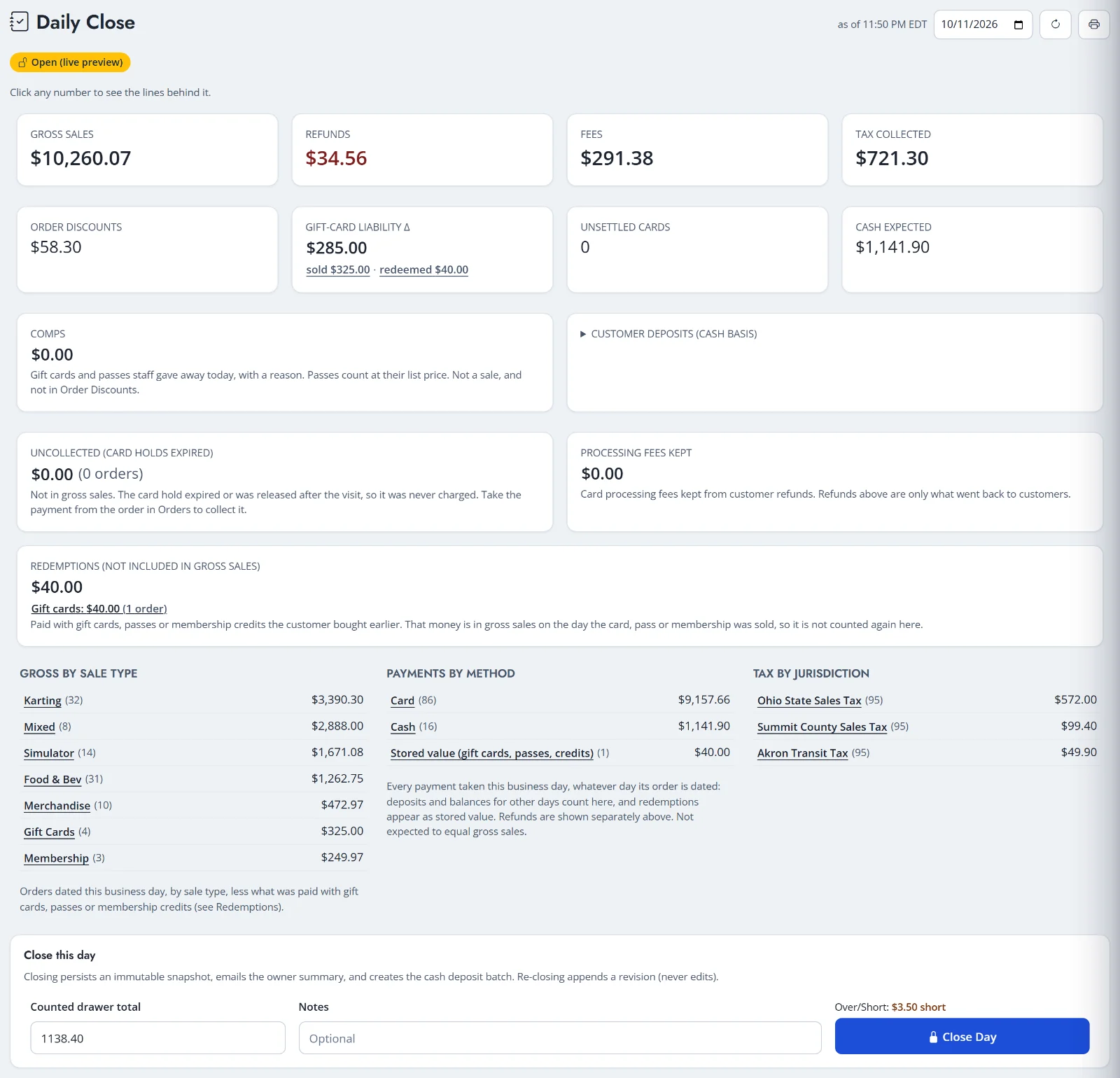
The Daily Close totals sales, payments, refunds, tax and gift card liability, and shows the drawer over or short before you close. Every payment gets one receipt from your venue, with the card brand, last four digits and authorization code.

How the Daily Close works →
Chores that go away

The small jobs that quietly eat a shift.

Most of a busy day is small jobs. Here is what changes when the system does them.

What fills a shift today

  • Chasing signatures at the counter while the line grows
  • Typing in a guest who has been here before
  • "How much is left on my gift card?" on the phone
  • "I never got my confirmation"
  • Walking to a rig to tell a driver their time is nearly up
  • Asking for the card again for ten more minutes
  • Adding up the drawer and the card batch at midnight

What happens instead

  • Waivers are signed before arrival, and the desk sees who still owes what
  • Check-in finds the customer you already have, so nobody types them in twice
  • Guests check their own balance on a public gift card balance page
  • Staff resend a confirmation or receipt from the booking’s History
  • For sim racing, Session Control messages one driver or the whole grid, on screen and read aloud
  • Extra time is charged from the card hold you already have
  • The Daily Close shows over or short before you close
Answers on every channel, when you want them. Help Desk can answer routine questions on web chat, email and your support form from your own settings and articles, in the guest’s own language, and hand anything else to your team. You turn it on per channel when you’re ready. With the Voice add-on, voicemails and missed calls become tickets with the recording. Help Desk and Voice are add-ons, priced on the pricing page. How the inbox works · How the phone system works
The Operations board

One board for the whole floor.

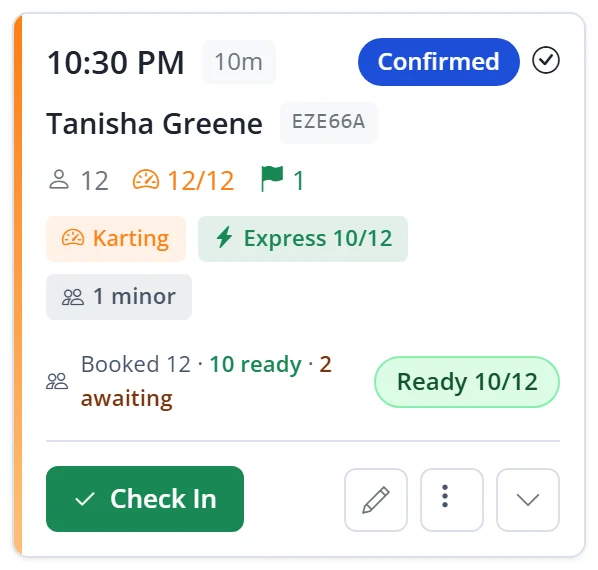
The Operations board shows today’s bookings as cards, each with a Ready count, Check In and Start. Staff see who is not ready and fix it from the card instead of walking between screens.

  • Ready 10 of 12. The chip opens check-in at the first person who is not ready yet.
  • A Start that checks first. A booking with a missing waiver, guardian or safety step does not start. A manager can override where your venue allows it, and the reason is recorded.
  • Retry launch. A simulator launch that fails can be retried from the board.
  • Controls that report back (early access). When a booking starts a game or the lights, the card shows whether it worked, with Retry and Done by hand, and a failure raises an alert.
  • Broken karts stay off the track. A kart in maintenance shows as blocked, with its open work orders, and no heat starts with a kart that is out of service. How maintenance works
  • Guests know where to go. An Up Next screen on your TVs shows what starts in the next few minutes, with spoken call-ups (screens are part of the Platform plan).

How the board and check-in fit together →

Operations board booking card for a party of 12 with a Ready 10/12 chip and a Check In button
A party of 12 on the Operations board: ten are ready, and one tap opens check-in at the next person.
Close the day

Close the day in minutes, not at midnight.

The Daily Close puts every sale, payment and refund for the day on one screen, and an exceptions list names what needs a look. Closed days are never edited; closing again adds a new revision.

  • Count the cash, see the difference. Type in what you counted and see over or short before you close.
  • Payouts that match. Stripe payouts are matched to the sales they covered, with fees and net shown.
  • Gift cards counted right. A gift card counts as income when it is spent, not when it is sold.
  • Receipts from your venue. Desk, kiosk, bar, online and membership renewals each get one receipt with your venue’s details, and every refund sends one too.
  • Never charged twice. Two devices paying the same tab pay once, and a check can’t be closed twice.
  • The stock room too. With the Purchasing add-on, purchase orders, goods-in and invoice checks sit beside the sales they feed. How purchase orders work

How the Daily Close works →

Daily Close for a Sunday: gross sales, refunds, fees, tax, gift card liability, cash expected and sales by type
A Sunday’s Daily Close: sales by type, refunds, fees, tax, gift card liability and the cash you should have.
On card payments: card payments go into your own Stripe account. You pay Stripe’s standard fees directly, and VenueChief adds nothing on top. You can also use your own Square account.
Your team

Everyone on the team, with no charge per seat.

Staff users are unlimited, across 26 roles, so a weekend hire can check people in without seeing your revenue. The schedule, the time clock and the payroll export sit beside the bookings they cover.

Roles

The right screens for each person

Job roles, access levels and qualifications that warn before they expire. One action ends a leaver’s access.

Schedule

Shifts and on-call cover

A weekly schedule with an on-call lane and copy-last-week, on the Platform plan.

Time clock

Hours, tips and the export

PINs, breaks, timesheets you approve, tips and commission, and a payroll export, with the Workforce add-on. Your payroll provider stays where it is.

Settings

Find any setting by name

Venue Settings is one searchable page, and Ctrl+K or the assistant finds a setting by name and takes you to it.

Alerts

Problems reach a person

Staff alerts arrive by email and text with the details and a link. Marking one fixed takes a note for the next shift.

Assistant

Ask for it in plain words

The built-in assistant is in every plan. It acts with the asker’s own role, and every change comes back as a card to confirm. AI for venues

How scheduling and the time clock work →

Said plainly

What we don’t do yet.

You should hear the limits now, not in month three. These are the ones that matter most on a busy day.

Money

  • Card payments run on Stripe or Square only.
  • We are not a general ledger or accounting software.
  • We export hours, tips and commission. We don’t run payroll.

Hardware

  • Receipt and kitchen printers: Star and Epson only.

One provider for some connections

  • Outreach sends from Microsoft 365 mailboxes only.
  • Help Desk social channels are Messenger and Instagram, once Meta approves them.

Early access

  • Door codes, unattended hours, automations and booking controls are early access: we set them up with you.

Read the full list of what we don’t do →

And the contract: no lock-in and no exit penalty, and your guest data is yours to export. Read the commitments we make.
Straight answers

Questions owners ask about running the day

What is venue operations software?

It is the software that runs the day after the booking: check-in, waivers, starting sessions, food and drink, extra time, staff and the end-of-day close. In VenueChief all of that sits on the same system as your online booking and your website, so a guest is one record from the first click to the receipt.

Do we need kiosks?

No. The desk can do everything a kiosk does. Kiosks are part of the Platform plan at $579 a month, and kiosks and screens are not licensed per device, so adding a second kiosk is a hardware decision, not a software one.

How many staff logins do we get?

As many as you need. Staff users are unlimited on every plan, across 26 roles, so hiring a weekend team never becomes a software decision.

Do you take a cut of our card payments?

No. Card payments go into your own Stripe account. You pay Stripe’s standard fees directly, and VenueChief adds nothing on top. You can also use your own Square account.

Can we open with nobody at the desk?

For some hours, yes. Door codes tied to bookings and unattended operation are on the Platform plan in early access, so we set them up with you and check them on your site before you rely on them.

See it on your venue

Walk us through your busiest hour.

Tell us what happens on a Saturday at two, from the first guest through the door to the last receipt. We’ll show you the same hour in VenueChief, on your own kind of venue.

Thirty minutes. No slide deck. Prefer to talk now? Call or text 234-348-3683.

Where to go next

Each part of the day, one article at a time.

Related pages

The rest of VenueChief, around the day.