Venue Website With Online Booking

Venue website with online booking

Your website comes with it, and it books, sells and keeps score.

At a glance: Every VenueChief plan includes a venue website with online booking, built on the same system as your schedule, so what guests book online is what your staff see. Your guests can also buy gift cards and memberships, sign waivers, manage their own bookings and follow the leaderboards on it, or you can keep the website you have and drop VenueChief booking into it.
Three ways to start

Start from a design, from your old site, or keep the one you have.

There is no blank page. Pick the way that fits where your venue is today, and change your mind later if you want to.

A starter design

Built for your kind of venue

We set your site up from a starter design for your venue type, with real photos and a color scheme: Pit Lane, Grand Prix and Paddock Club for sim racing, Race Day for karting, Clubhouse for golf, Fun Center for family entertainment, and Kitchen & Bar or Social Club. Then you change words and pictures the way you would on any page.
How the website builder works →

Your current site

Import it and keep the look

Import a Website reads your current site, including Squarespace, Shopify, WooCommerce, Wix, Weebly and Square Online, and rebuilds it as pages you can edit, with your products in the shop. It shows how closely the copy matches the old site and what got better, and one action undoes the whole import.

How the import works →

Your own website

Keep it and drop booking in

Put VenueChief booking, the shop and the guest account on any website with copy-and-paste tags, a WordPress plugin or plain button links. Guests pay and come straight back to your page, and it costs the same on every plan.

Already have software? →

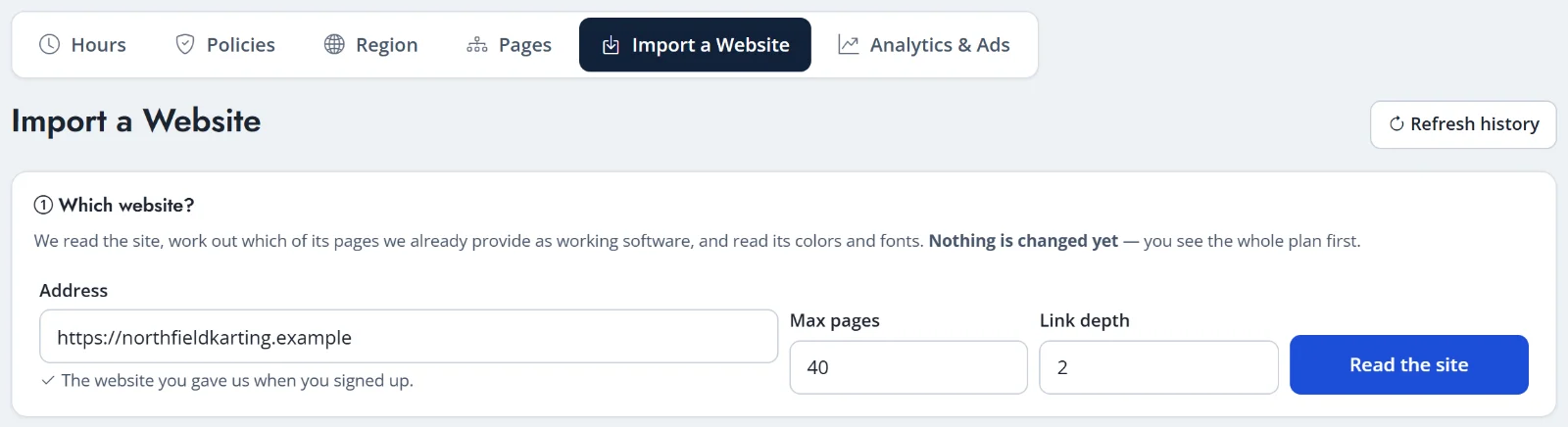
Import a Website tab beside Pages, with a website address, a 40 page limit, link depth 2 and a Read the site button
Import a Website: paste your current address, and it lists every page it found before anything is written.
What your guests can do on it

A website that does the desk’s routine work.

The pages below come with the site and read from the same data your staff use. Guests answer their own questions, and the desk gets fewer calls.

Booking

Book and come back

  • Book Now with packages, add-ons and several activities in one basket
  • A waitlist for full karting heats, when you turn it on
  • Groups that take turns on fewer simulators and pay only for the rigs they use

How online booking works →

Sales

Sell more than time

  • A shop and basket for passes and memberships, and merchandise with the Retail Storefront pack
  • Gift cards with bonus offers, a chosen delivery date and a public balance check
  • Gift passes, sent with a code and no account needed
  • Memberships with real free trials: the card is checked for $0

How gift cards and memberships work →

Guest account

Answers without a phone call

  • My Account with family members, passes, memberships and laps
  • Manage a booking without signing in
  • Waivers and details completed before arrival
  • For sim racing, the session page: the guest’s phone as the rig remote, add time, go again

How online waivers work →

Racing

Leaderboards that bring racers back

  • Live leaderboards, the Tonight board, records and personal bests
  • Challenges ranked per track layout
  • League and round pages with sign-up
  • "See all your laps" after every session, with no sign-in

How leaderboards work →

Events and food

Parties and plates

  • An events calendar and an event page for each event
  • Private event links for the host and their guests
  • Order and pay at the table by QR code, when you turn it on

How private events work →

Content and support

Say it once, keep it current

  • News with article pages and an RSS feed
  • Web chat and a public knowledge base, when you turn them on
  • A working contact form, and forms that add people to your contacts
  • Community boards and polls for your regulars
  • Policy pages that follow your settings

How messages reach your team →

Policies that keep themselves current. Your cancellation policy, terms and privacy pages read from your live settings, and a check lists any page that disagrees with them, so the website never promises a policy you changed last month.
Edit it by asking

Point at your website and say what you want.

Press Edit on any page of your live site, click what you want to change and type what you want. It handles everyday requests, not every request, and every change has an Undo.

  • Keep, Undo or Try again. The change appears in place, and you decide whether it stays.
  • This page or the whole site. Ask for one page, a few pages or every page, with one Publish and one Undo.
  • Every change has a name on it. Recent changes lists who made each change, a person or an AI working for that person, with an Undo.
  • Or edit by hand. More than 50 block types, saved blocks and templates, desktop, tablet and phone views, and light and dark looks.
  • Bring your own AI. Connecting Claude or ChatGPT to design your website is included in every plan.

How the AI works, and what it asks first →

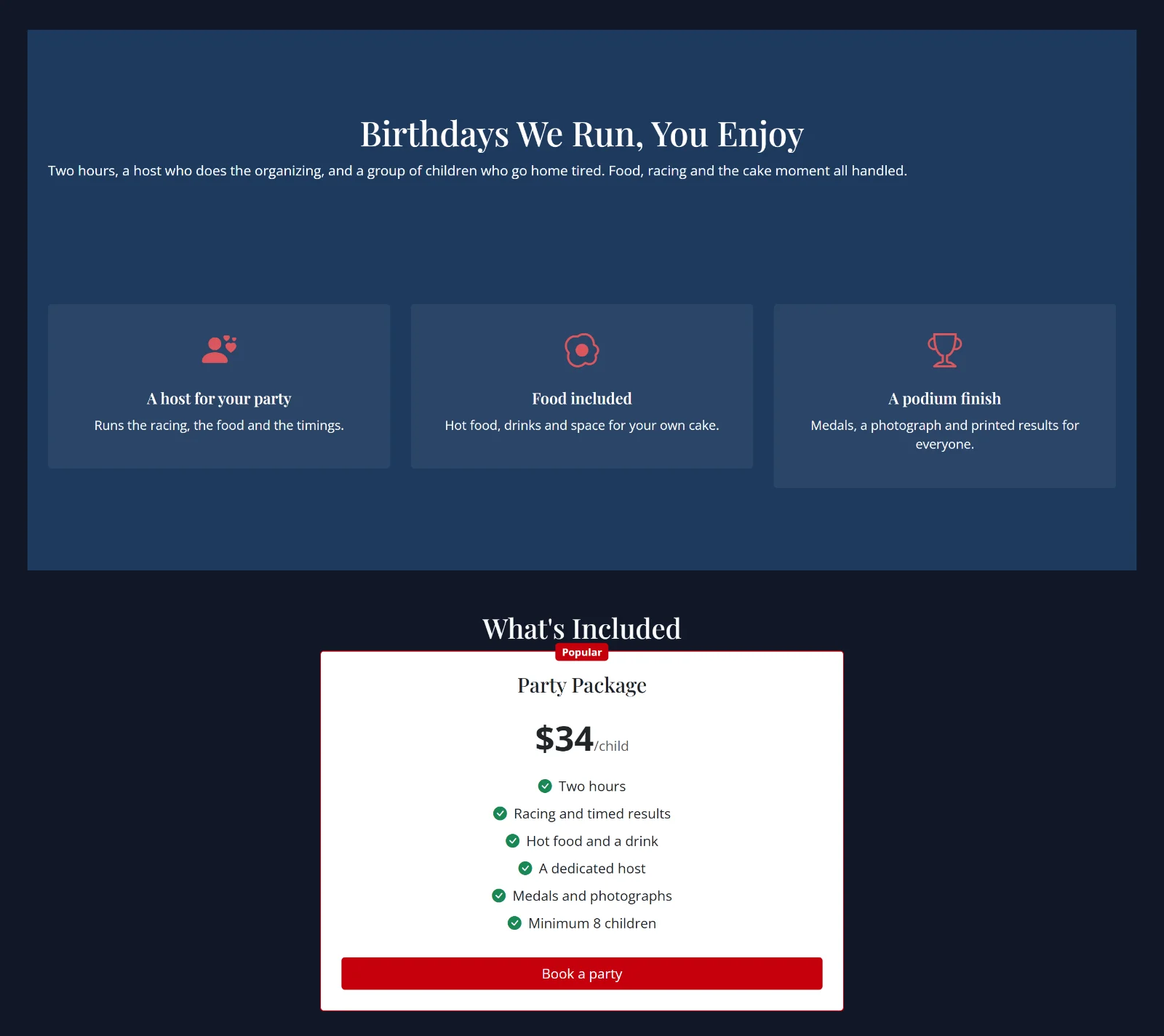
Published birthday party page with a headline, three feature boxes and a party package price card with a Book a party button
A published birthday party page, with its package price card and a Book a party button.
Your own address

Your domain, with your old links still working.

New sites get a free yourname.venuechief.com address, and you can connect a domain you own for the whole site or just for booking. Your old site keeps running until you make the switch.

  • Records checked one by one. The setup screen shows the exact domain records to add and checks each one, and the certificate is set up for you.
  • Old addresses forwarded. Moved pages forward with permanent redirects, and a redirects manager lists the addresses visitors missed.
  • Town only, if you prefer. You can keep your street address off the website and show only your town.

How a custom domain works →

Fast and found

Pages that arrive finished and get found.

Pages load with fewer files in the way, and the search basics are done for you. On one imported karting site we measured the main content painting in 0.4 seconds on a desktop and 1.4 seconds on a phone, in a lab test; your numbers depend on your pictures and pages.

  • Pictures sized for the web. Imported pictures are saved as WebP at their original quality and the right size.
  • Clean search basics. The sitemap lists only public pages, every site has a robots.txt, and pattern redirects keep old links working.
  • Your real hours. Late-night hours read correctly on the site, the footer and to search engines, such as "11 AM – 1 AM".
  • News that ranks. Each article gets its own page for search engines, and the home page can show the latest ones.
  • Fonts from your own site. Google fonts are served from your site, not from a third party.
  • A privacy choices banner. It names each tag and honors Global Privacy Control. You turn it on when you’re ready; it is a tool, not legal advice.

The website migration checklist →

Said plainly

Where the website stops.

An import copies pages, pictures, the menu and the shop. Forum and course areas stay on the old site, and background videos over 50 MB are not copied.

There is no app in the app store: the website, the guest account and the kiosk all run in a browser and work on a phone. See everything we don’t do. And the contract is plain: no lock-in, and your website and guest data are yours to export. Read the commitments we make.

Straight answers

Questions owners ask about the website

Is the website really included?

Yes. The website and the page builder are part of every plan, starting with Booking at $279 a month, along with online booking, guest accounts, waivers, gift cards and memberships. There is no separate website fee.

Can we keep our current website?

Yes. Put VenueChief booking, the shop and the guest account on your own site with copy-and-paste tags, a WordPress plugin or button links. Guests pay and come back to your page, and the price is the same on every plan.

Will moving our website hurt our search ranking?

A move always needs care. Import a Website brings your pages, titles and descriptions across, moved pages forward with permanent redirects, and a redirects manager shows the addresses visitors still try. The migration checklist walks through what to list before you move.

Who builds the site?

We set your site up from a starter design for your venue type, or import the site you have, as part of setup. After that you edit it yourself, by hand or by asking, and every change can be undone.

Can guests book on their phones?

Yes. Every page, the booking flow and the guest account work in a phone browser, with nothing to download. Guests can also scan the QR on a simulator and use their phone as the rig remote during their session.

See it on your venue

Send us your website address.

Bring the site you have today. We’ll show you what an import of it looks like, with booking in place, on a VenueChief site branded to you.

Thirty minutes. No slide deck. Prefer to talk now? Call or text 234-348-3683.

Where to go next

The website, one part at a time.

Related pages

What sits behind the website.